
Compare
OpenDog vs Groomer.io for mobile groomers.
Groomer.io is groomer-specific and familiar to many grooming businesses. OpenDog is built around a simpler mobile workflow that keeps route, pet notes, client messages, payment status, and rebooking connected. SMS delivery remains pending provider approval.
OpenDog workflow
Compare against connected grooming work.
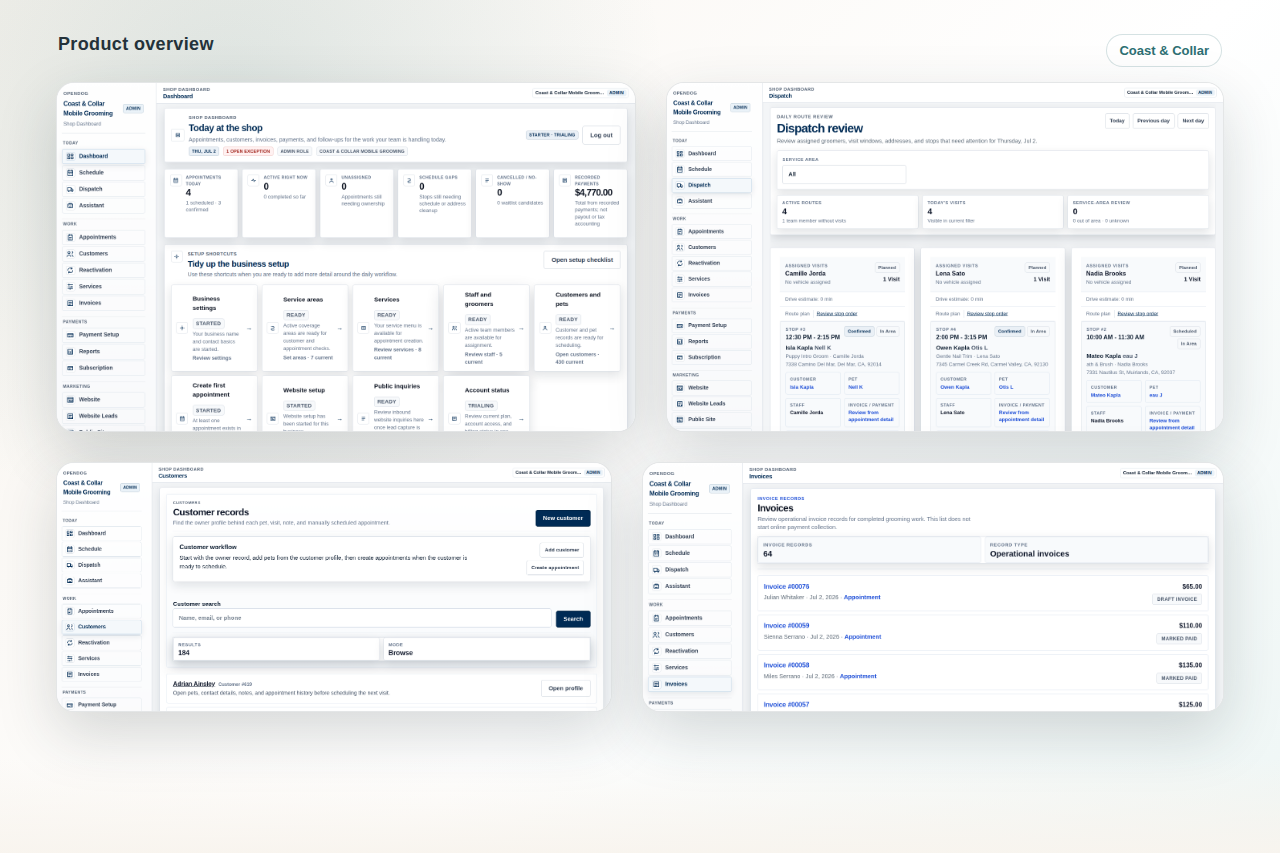
Use route, request, customer, pet, invoice, and follow-up context to evaluate whether OpenDog fits the real mobile grooming day.
Who this comparison is for
Use this page if your grooming business is evaluating Groomer.io alongside OpenDog and wants a fair decision framework instead of a feature-list fight. Confirm current Groomer.io features, pricing, terms, and setup details directly with that vendor, then compare both tools against the route day your shop actually runs.
Quick take
Groomer.io may be a fit for grooming businesses that want a groomer-specific system with familiar salon and grooming workflow coverage. Consider OpenDog if your priority is a mobile-first grooming workflow around route review, request control, pet notes, owner and groomer clarity, invoice context, rebooking, hosted request pages, and self-serve setup.
OpenDog positioning
OpenDog is built around mobile grooming routes, pets, requests, invoices, receipts, and follow-up. It is designed for solo groomers and small teams that want practical daily workflow clarity rather than a sample-account feature list or unverified claims about other vendors.
Evaluate scheduling and route review
Ask both vendors how the system handles service areas, drive time, route order, assigned groomers or vans, appointment gaps, late changes, and customer requests that do not fit the day. For mobile grooming, the best schedule is the one that respects the route before it breaks.
Evaluate website and request flow
Ask whether public lead capture is a disconnected website form or part of the same grooming workflow. OpenDog is strongest when hosted website pages, service-area language, service menu expectations, and request review support the route instead of bypassing it.
Evaluate customer and pet context
Compare how each system handles customer profiles, pet profiles, multi-pet households, health and safety notes, behavior and handling preferences, grooming history, photos, prices, and owner instructions.
- Where do pet notes appear for the groomer?
- Can duplicate records be reviewed?
- Can history stay tied to the pet and appointment?
Evaluate owner and groomer workflow
Owners need business visibility while groomers need a simple field view. Ask both vendors what the groomer sees before arrival, how appointment changes appear, and how owner-only work stays separate from field work.
- Review staff access and permissions.
- Open the day view during a demo.
- Test a route-sensitive appointment.
Evaluate booking, requests, invoices, and receipts
Ask how customers request appointments, how the shop confirms timing, how invoices are created, how payment status and receipts appear, and what provider setup is required. Avoid assuming payment or booking automation unless it is confirmed for the actual setup.
Evaluate setup, support, reports, and exports
Ask what happens to existing clients, pets, services, notes, appointments, reports, exports, policies, and booking habits before the business relies on a new system. A careful setup plan matters more than a rushed launch.
- What import review is included?
- Which reports and exports are available?
- What support expectations are realistic?
Questions to ask both vendors
Bring the same scenarios into each demo: a new customer request outside the usual area, a repeat pet with handling notes, a multi-pet household, a late cancellation, an unpaid invoice, a groomer handoff, and a rebooking follow-up. The stronger fit is the one that handles those examples with less confusion.
Decision worksheet for mobile groomers
After each demo, score the tool on route review, request control, pet note visibility, groomer field workflow, invoice and receipt clarity, setup help, exports, and what still requires texts or spreadsheets. The right choice is the one the business can trust during the first live week, not only the one that looks complete in a sample account.
Recommended next steps
Review the OpenDog product tour, read the buyer guide, use the demo checklist, and create your account if OpenDog looks aligned with your route, records, request, invoice, hosted website, and follow-up workflow.
Comparison note
Groomer.io is a trademark of its owner. This page is not endorsed by or affiliated with Groomer.io. Competitor details can change, so verify current pricing, features, contract terms, support, and provider setup directly with each vendor.
FAQ
Common questions from grooming businesses.
Is OpenDog making feature-by-feature claims about Groomer.io?
No. This page focuses on OpenDog positioning and fair evaluation questions. Confirm Groomer.io current features, pricing, terms, and setup directly with that vendor.
How do I compare both tools fairly?
Use the same real workflow in both demos: route planning, pet notes, request review, invoice, receipt, groomer access, exports, and rebooking.
Who is OpenDog designed for?
OpenDog is designed for mobile-first grooming businesses that want route-aware scheduling, request review, customer and pet records, field visibility, invoices, receipts, reports, and self-serve setup.
What do I ask before switching?
Ask how clients, pets, notes, services, appointments, policies, reports, exports, and current booking habits are reviewed before launch.
Where do I go next?
Review the OpenDog product tour, buyer guide, demo checklist, pricing, and self-serve setup path before changing the live workflow.
Compare OpenDog against your real route day.
Use your actual requests, pet records, route changes, invoices, and follow-up tasks to decide whether OpenDog is the practical fit.